Adding transformations to multiscale images
Adding transformations to individual multiscale images is a way to enrich the metadata associated with the image. This can be useful to inform implementations on how to view or interpret the image data, i.e. if an image is supposed to be viewed with a rotation or a shear applied.
import numpy as np

from ome_zarr import OMEZarrImage, OMEZarrMultiscale
data = np.random.rand(256, 256)
image = OMEZarrImage(data=data, axes="yx", name="My Image")

ms = OMEZarrMultiscale(image=image)
We can inspect the metadata of the multiscale image to see what coordinate systems are currently present:
ms.metadata.coordinateSystems
(CoordinateSystem(name='physical', axes=(Axis(name='y', type='space', discrete=False, unit=None, longName=None), Axis(name='x', type='space', discrete=False, unit=None, longName=None))),)
To attach another transformation to the multiscale image, we need to specify both the transform as well as the coordinate system it outputs to. In this case, we define a rotation transformation that outputs into a “world” coordinate system. The rotation transformation is written as a rotation matrix \(R\) that rotates the image by an angle of 45 degrees (counter-clockwise):
\( R = \begin{bmatrix} \cos(45°) & -\sin(45°) \\ \sin(45°) & \cos(45°) \end{bmatrix} = \begin{bmatrix} \cos(\pi/4) & -\sin(\pi/4) \\ \sin(\pi/4) & \cos(\pi/4) \end{bmatrix} \)
Warning
Saving transformations metadata is only supported in ome-zarr versions beyond 0.6.dev4.
The desired ome-zarr version can be specified on write with the version parameter of the to_ome_zarr method.
rotation_transform = {
    "type": "rotation",
    "rotation": [
        [np.cos(np.pi/4), -np.sin(np.pi/4)],
        [np.sin(np.pi/4), np.cos(np.pi/4)]
    ],
    "input": {"name": "physical"},
    "output": {"name": "world"}
}

world_cs = {
    "name": "world",
    "axes": [
        {"name": "y", "type": "space"},
        {"name": "x", "type": "space"}
    ],
}
The output field refers to the name world of the created coordinate system.
The input field refers to the intrinsic/physical coordinate system of the image, which defaults to physical if not specified otherwise.
We can then just pass these to the OMEZarrMultiscale constructor as follows:
ms = OMEZarrMultiscale(
    image=image,
    coordinate_transformations=[rotation_transform],
    coordinate_systems=[world_cs],
    )
And that’s it! A viewer could now choose to show your image in the “world” coordinate system, which would apply the rotation transformation to the image data, such as this:
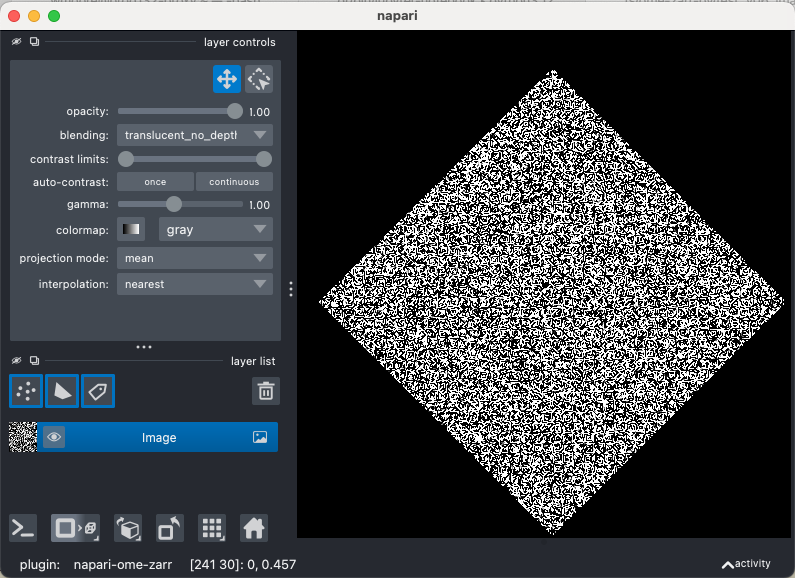
For more information of how to construct transformations, see the respective section of the specification.
ms.to_ome_zarr(
    "multiscale_with_transforms.ome.zarr",
    version="0.6.dev4",  # specify the desired ome-zarr version
    overwrite=True,
)
[]